How to create a pop-up newsletter form from a button on Squarespace
The most common question I get asked is ‘how do I create a pop-up newsletter sign up from clicking on a button?’
This pop-up feature is known as a ‘lightbox’ and it allows the form element to be hidden from the main page - only being revealed when the button is clicked. An example can be seen on the button below.
There are a couple of ways that this can be achieved, and they depend on the storage option (or mailing list host) you would like to use for the data (eg. Mailchimp or Squarespace Campaigns). Frustratingly Squarespace haven’t made implementing a lightbox button for a newsletter straightforward, but I will outline the options below:
Newsletter Block:
You would be correct in thinking that it’s the newsletter block you need, however there is currently no lightbox option associated with this block, so you have no choice but to have the form visible as shown below.
Pros:
You can choose if you require the name field (email address is required by default)
You can link the data to mailing lists on either Mailchimp or Squarespace Campaigns easily
You can add in more text content by using a title, description and disclaimer
Cons:
There is no lightbox option (currently) available
Coding is required to request a first name only
You are only able to request name and email address
Form Block:
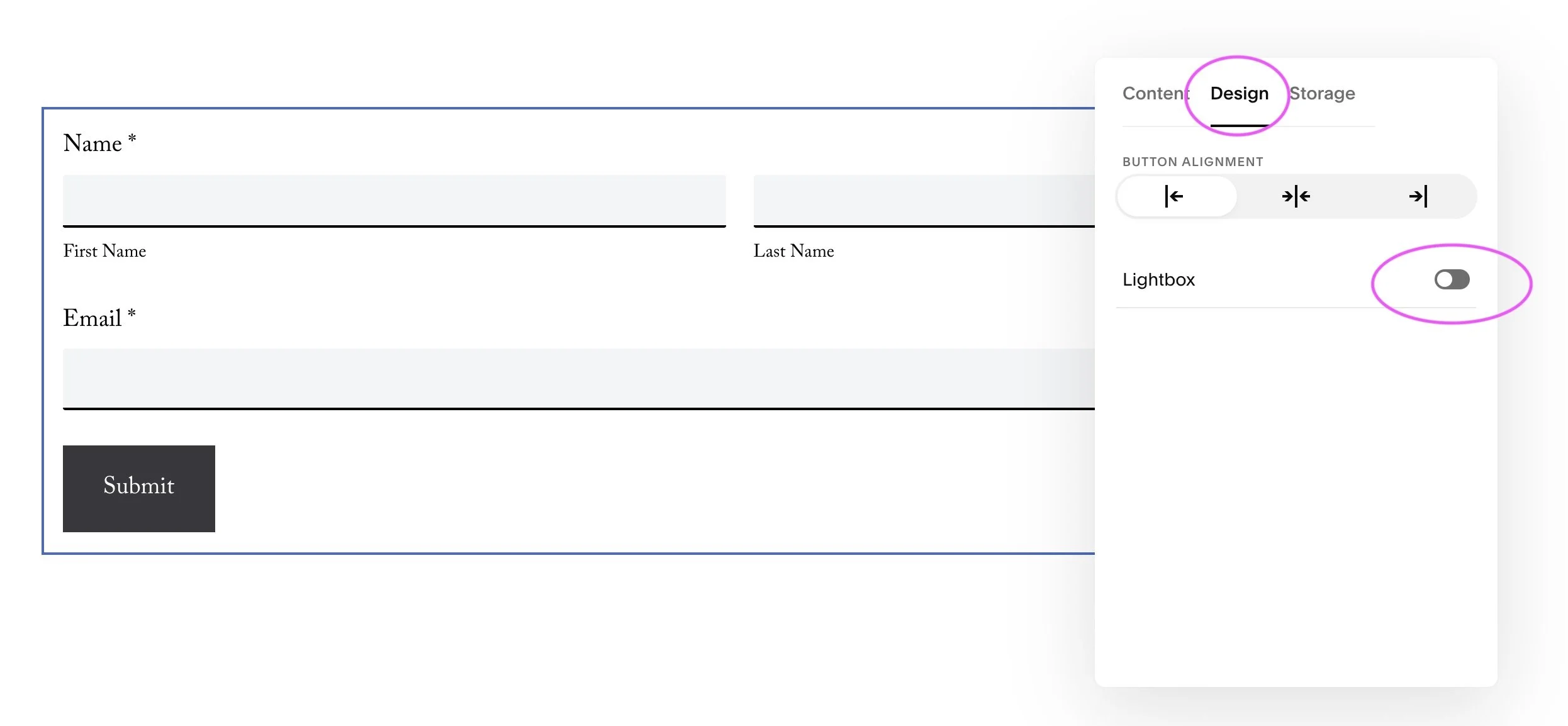
Form blocks are not traditionally used for newsletter sign ups, however as they can be linked to Mailchimp and they have a lightbox option, we are able to adapt this to work for mailing list sign ups or lead magnets.
Pros:
Lightbox is an option (see image below for where to find this)
Additional information can be requested such as address or birthday
Data can be linked to Mailchimp mailing list
Cons:
You are unable to link a form block to a Squarespace Campaign mailing list
There is only a limited space available for content / descriptions
Use a Plugin:
To create a lightbox newsletter sign up form that links to a Squarespace Campaigns mailing list, the only option (currently) available is to use a plugin. A plugin is some behind the scenes code that allows you to implement features outside of the default Squarespace offering. The one that I use is Squarespace Lightbox Anything* because, as the name suggests it allows you to lightbox absolutely anything! Not just newsletter pop-up forms (think size guides, delivery details, before and after images etc). It’s really user friendly and easy to upload to your site, so if you would like to include a lightbox feature within your website I would highly recommend using this plugin - see an example HERE.
Pros:
This lightbox plugin can be used in multiple ways across your website, not just for newsletter blocks
You are able to link a newsletter lightbox to Mailchimp or Squarespace Campaigns
Cons:
You have to pay for the plugin
*This is an affiliate link. When you click on an affiliate link and make a purchase, I receive a small commission at no cost to you.
Need help with your Squarespace website?
If you need help creating newsletter pop-up blocks, or have other troublesome areas why not book me to update your website for you. Check out the Half-Day Refresh for more details.